Ask for the item that is holding up the job.
Link the request to the client and period. When the record is filed against the request, colleagues can see it has arrived.

Accountancy · Live
See which records are missing, who has the work and what needs partner review.
Why choose Fortis BMS?
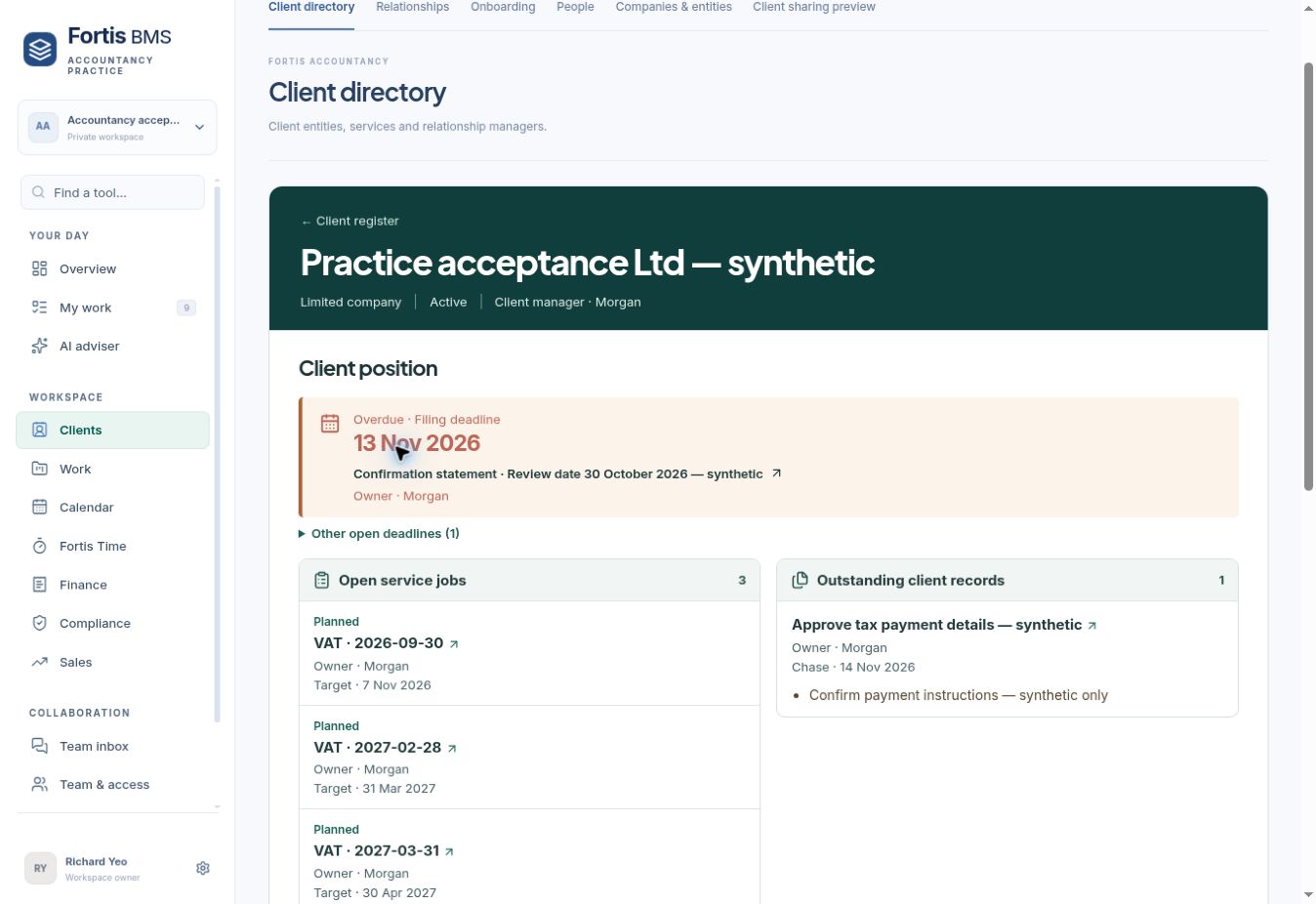
Give everyone handling a client the context to act. Connect the relationship with the records, the period of work and the next decision.
Link the request to the client and period. When the record is filed against the request, colleagues can see it has arrived.
Keep period jobs, originals, open questions and the next action together. Help the reviewer identify what still needs attention.
Review extracted invoice fields and labour or materials coding before the approved accounting handoff. Pilot scope is shown in the workflow below.
Make the case in your own practice
| What to assess | What to inspect in Fortis | What your team can compare |
|---|---|---|
| Missing records | Specific requests linked to the client and job. | How you identify a blocker and confirm receipt today. |
| Handover | The period, owner, source documents and next action. | What a colleague needs to find before continuing. |
| Invoice review | The original document, extracted fields and line coding. | Where your team repeats entry or checks an amount. |
| Accounting handoff | An approved draft and its original attachment in the configured pilot. | The review steps and connection checks your practice requires. |
Bring a familiar job to a demonstration and judge the workflow against the way your team works today.
Built for accountancy practices
Bring client onboarding, records requests, documents and delivery into one working context. Give the preparer, reviewer and client a clear next step.
Explore a client workflowFrom client setup to the ledger
Explore eight stages using one example client. The interfaces below explain the workflow with fictitious data. Availability and approval requirements are shown at each stage.
Set up a client
Create the company, name the client manager, enter the year end and choose the services the practice will deliver. The client starts in onboarding, ready for the linked people and records.
For your practice
A consistent starting point for the people taking on the bookkeeping, compliance and review work.
Client created · Onboarding
Illustrative interface · Fictitious client · Select the action to reveal the review outcome.
Review AML
Link the beneficial owners, record the identity evidence, assess the risks and record the practice decision with its reviewer and next review date.
For your practice
The next person can see what remains unresolved before the practice records its decision. External provider screening depends on the configured service.
Address evidence flagged · Reviewer action required
Illustrative interface · Fictitious client · Select the action to reveal the review outcome.
Import an invoice
Select the client and invoice type, upload the PDF or image and review the extracted supplier, dates, reference and amounts before approval.
For your practice
Resolve a questionable amount against its source without searching through a separate inbox. Capture and ledger posting have separate approval steps.
Extracted fields ready for human review
Illustrative interface · Fictitious client · Select the action to reveal the review outcome.
Split CIS lines
Review each invoice line and give labour and materials their appropriate coding. Check the line values and total before approving the invoice for its accounting handoff.
For your practice
A reviewer can inspect the split and its source before deciding the tax treatment. This example demonstrates line coding. CIS deductions and returns require their own checks.
Labour £600.00 + Materials £240.00 = £840.00
Illustrative interface · Fictitious client · Select the action to reveal the review outcome.
File a statement
Choose the business, statement period and outstanding records request. Review the PDF or CSV, check the bank-feed or manual status and approve the filing.
For your practice
The person chasing records and the person preparing the work can see the same receipt status. Transaction import is a separate step.
Statement filed · Requested item marked received
Illustrative interface · Fictitious client · Select the action to reveal the review outcome.
Send to accounting
Review the client mapping, invoice type and accounting destination before sending an approved invoice. Check the returned draft and the original document attachment.
For your practice
Reduce re-entry of approved invoice data while keeping a visible review point in the accounting system. Each practice connection and mapping needs validation.
Approved source → Xero draft → Attachment check
Illustrative interface · Fictitious client · Select the action to reveal the review outcome.
Open the client file
Open the client’s documents and the relevant period of work. Keep the original records available to the preparer and reviewer alongside the requests and next action.
For your practice
A colleague can follow the evidence behind the work and identify the next action without asking the preparer to reconstruct the file.
Originals and next action available for handover
Illustrative interface · Fictitious client · Select the action to reveal the review outcome.
Use the portal
Give a named client contact access to selected documents and requests. The client can respond to a request with a file, while the team controls the shared material.
For your practice
Keep the request and response together. Internal notes and AML material stay within the practice’s controlled file.
Selected request shared · Client can respond with a file
Illustrative interface · Fictitious client · Select the action to reveal the review outcome.
Why move to Fortis?
Keep the original invoice, statement and records request in the same client context. Review what arrived and what still needs chasing.
Give the next colleague the period, owner, due date and outstanding records so work can continue through preparation and review.
Intelligent Compute helps with document extraction and finding work that needs attention. Staff check the source and approve the next action.
Evaluate it against your current setup
Start with one client and one period. Walk through intake, evidence, line coding, the ledger handoff and partner review. Compare the steps, duplicate entry and gaps your team handles today.
Prepare your practice walkthroughAccountancy is the live industry edition. Invoice capture and the demonstrated Xero handoff remain owner pilots. Production onboarding and migration should be agreed for your practice.
Recorded overview
This recording covers the worklist and client file. Use the detailed workflow above to explore onboarding, AML, intake, CIS line review, accounting handoffs and the portal. A full recorded demonstration of those actions is being prepared.